

NOTE
PS
本篇内容为博主以前已经完成的事件的记录,并非完成后立即写的文章 {% endnote %}
前提
本篇内容以已经成功部署Valine作为评论系统为前提,如果还未部署,请参考官方文档
本网站一直在使用Valine作为评论系统,之前一直在想:wordpress里面的评论有邮件提醒功能,Valine能不能实现这种功能呢?于是我就到Google去搜索,然后发现了Valine-Admin这个项目
首先我们打开我们的Leancloud,进入我们的应用(我这里使用的是国际版,至于为什么选用国际版,有那么一丁点的原因的)
如图,点击云引擎-设置,然后将Valine-Admin的HTTPS仓库链接贴进去,链接如下:https://github.com/DesertsP/Valine-Admin.git
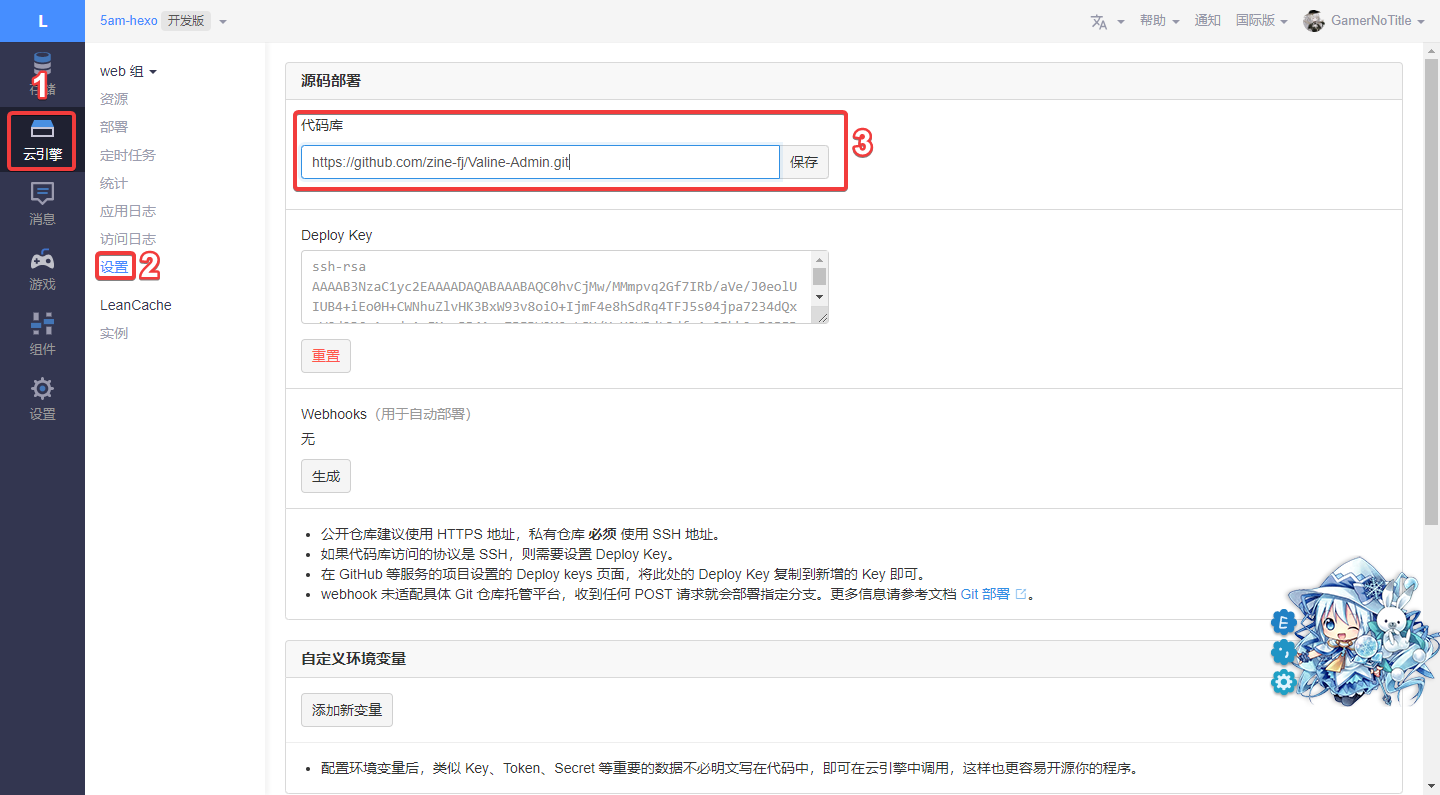
请注意,不要使用SSH链接,会因为没有权限而部署失败!
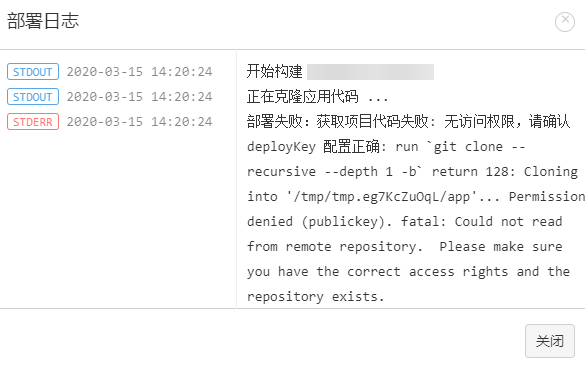
部署完后,我们需要按照教程配置我们的环境变量
下面是必填项(从官方教程搬过来的表格):
| 变量 | 示例 | 说明 |
|---|---|---|
| SITE_NAME | Deserts | [必填]博客名称 |
| SITE_URL | https://panjunwen.com | [必填]首页地址 |
| SMTP_SERVICE | [新版支持]邮件服务提供商,支持 QQ、163、126、Gmail 以及 更多 | |
| SMTP_USER | xxxxxx@qq.com | [必填]SMTP登录用户 |
| SMTP_PASS | ccxxxxxxxxch | [必填]SMTP登录密码(QQ邮箱需要获取独立密码) |
| SENDER_NAME | Deserts | [必填]发件人 |
| SENDER_EMAIL | xxxxxx@qq.com | [必填]发件邮箱 |
| ADMIN_URL | https://xxx.leanapp.cn/ | [建议]Web主机二级域名,用于自动唤醒 |
| BLOGGER_EMAIL | xxxxx@gmail.com | [可选]博主通知收件地址,默认使用SENDER_EMAIL |
| AKISMET_KEY | xxxxxxxxxxxx | [可选]Akismet Key 用于垃圾评论检测,设为MANUAL_REVIEW开启人工审核,留空不使用反垃圾 |
变量设置完成后,需要到下面Web主机域名框填写自己的后台管理面板的域名
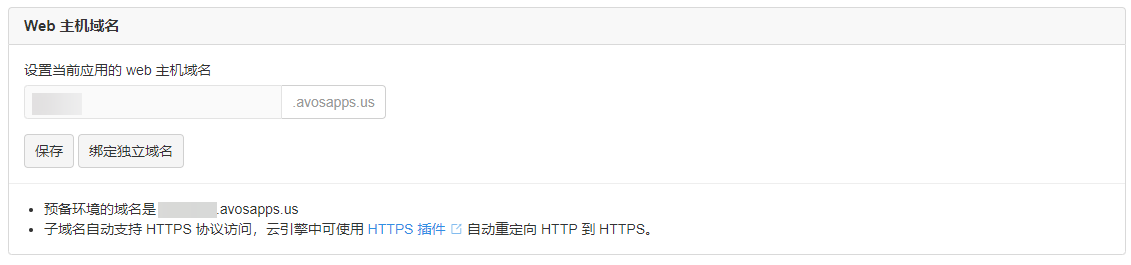
填写完后我们输入自己填写的域名就可以进入后台界面了,第一次进入会要求创建账户
CAUTION
如果直接是登录界面请先删除_User表中的所有数据!!!
登录界面应该长这样
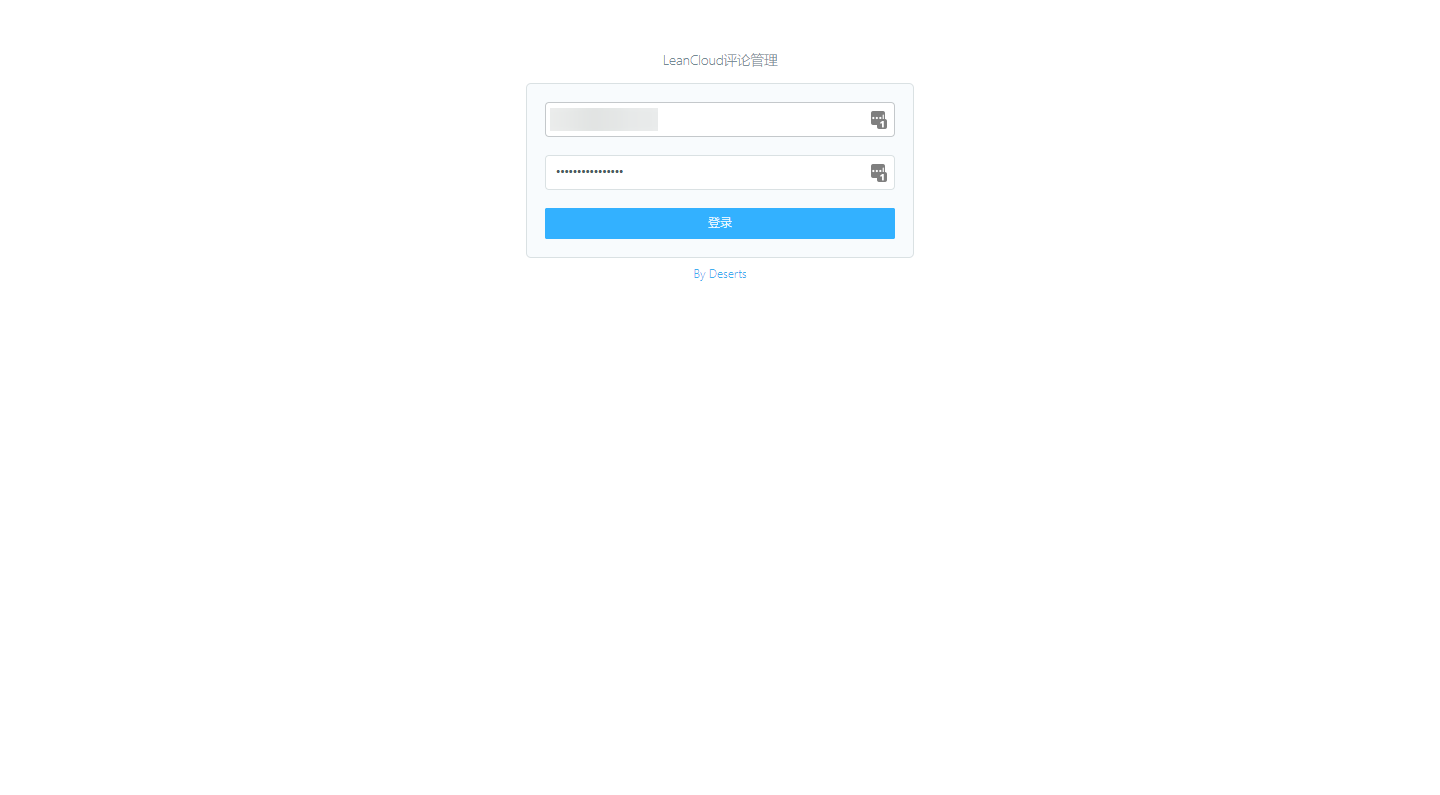
云引擎的其他相关配置我在这里不多说,可以去看官方教程,另外,关于博主的通知邮件,我在Rainbow模板上修改了一点,效果是这样的
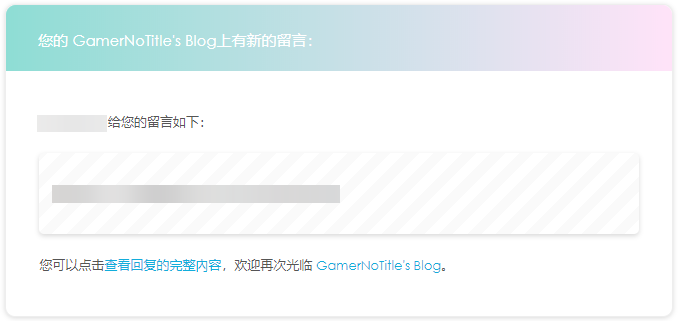
<div style="border-radius: 10px 10px 10px 10px;font-size:13px; color: #555555;width: 666px;font-family:'Century Gothic','Trebuchet MS','Hiragino Sans GB',微软雅黑,'Microsoft Yahei',Tahoma,Helvetica,Arial,'SimSun',sans-serif;margin:50px auto;border:1px solid #eee;max-width:100%;background: #ffffff repeating-linear-gradient(-45deg,#fff,#fff 1.125rem,transparent 1.125rem,transparent 2.25rem);box-shadow: 0 1px 5px rgba(0, 0, 0, 0.15);"><div style="width:100%;background:#49BDAD;color:#ffffff;border-radius: 10px 10px 0 0;background-image: -moz-linear-gradient(0deg, rgb(67, 198, 184), rgb(255, 209, 244));background-image: -webkit-linear-gradient(0deg, rgb(67, 198, 184), rgb(255, 209, 244));height: 66px;"><p style="font-size:15px;word-break:break-all;padding: 23px 32px;margin:0;background-color: hsla(0,0%,100%,.4);border-radius: 10px 10px 0 0;">您的<a style="text-decoration:none;color: #ffffff;" href="${SITE_URL}"> ${SITE_NAME}</a>上有新的留言:</p></div><div style="margin:40px auto;width:90%"><p>${NICK} 给您的留言如下:</p><div style="background: #fafafa repeating-linear-gradient(-45deg,#fff,#fff 1.125rem,transparent 1.125rem,transparent 2.25rem);box-shadow: 0 2px 5px rgba(0, 0, 0, 0.15);margin:20px 0px;padding:15px;border-radius:5px;font-size:14px;color:#555555;">${COMMENT}</div><p>您可以点击<a style="text-decoration:none; color:#12addb" href="${POST_URL}#comments">查看回复的完整內容</a>,欢迎再次光临<a style="text-decoration:none; color:#12addb" href="${SITE_URL}"> ${SITE_NAME}</a>。</p><style type="text/css">a:link{text-decoration:none}a:visited{text-decoration:none}a:hover{text-decoration:none}a:active{text-decoration:none}</style></div></div>而给用户的模板,使用的是官方的Rainbow模板
<div style="border-radius: 10px 10px 10px 10px;font-size:13px; color: #555555;width: 666px;font-family:'Century Gothic','Trebuchet MS','Hiragino Sans GB',微软雅黑,'Microsoft Yahei',Tahoma,Helvetica,Arial,'SimSun',sans-serif;margin:50px auto;border:1px solid #eee;max-width:100%;background: #ffffff repeating-linear-gradient(-45deg,#fff,#fff 1.125rem,transparent 1.125rem,transparent 2.25rem);box-shadow: 0 1px 5px rgba(0, 0, 0, 0.15);"><div style="width:100%;background:#49BDAD;color:#ffffff;border-radius: 10px 10px 0 0;background-image: -moz-linear-gradient(0deg, rgb(67, 198, 184), rgb(255, 209, 244));background-image: -webkit-linear-gradient(0deg, rgb(67, 198, 184), rgb(255, 209, 244));height: 66px;"><p style="font-size:15px;word-break:break-all;padding: 23px 32px;margin:0;background-color: hsla(0,0%,100%,.4);border-radius: 10px 10px 0 0;">您在<a style="text-decoration:none;color: #ffffff;" href="${SITE_URL}"> ${SITE_NAME}</a>上的留言有新回复啦!</p></div><div style="margin:40px auto;width:90%"><p>${PARENT_NICK} 同学,您曾在文章上发表评论:</p><div style="background: #fafafa repeating-linear-gradient(-45deg,#fff,#fff 1.125rem,transparent 1.125rem,transparent 2.25rem);box-shadow: 0 2px 5px rgba(0, 0, 0, 0.15);margin:20px 0px;padding:15px;border-radius:5px;font-size:14px;color:#555555;">${PARENT_COMMENT}</div><p>${NICK} 给您的回复如下:</p><div style="background: #fafafa repeating-linear-gradient(-45deg,#fff,#fff 1.125rem,transparent 1.125rem,transparent 2.25rem);box-shadow: 0 2px 5px rgba(0, 0, 0, 0.15);margin:20px 0px;padding:15px;border-radius:5px;font-size:14px;color:#555555;">${COMMENT}</div><p>您可以点击<a style="text-decoration:none; color:#12addb" href="${POST_URL}#comments">查看回复的完整內容</a>,欢迎再次光临<a style="text-decoration:none; color:#12addb" href="${SITE_URL}"> ${SITE_NAME}</a>。</p><style type="text/css">a:link{text-decoration:none}a:visited{text-decoration:none}a:hover{text-decoration:none}a:active{text-decoration:none}</style></div></div>WARNING
邮件提醒的坑
如果要使用邮件通知,不需要在你的网站配置中把Notify这一项设定为true,否则只会按照设置中重置密码的模板发送而不会使用在变量中设置的模板,并且云引擎也不会发送邮件;顺带可以把verify调整为false来避免出现Valine的反人类评论验证
根据教程配置完相关的变量和管理面板后,邮件就会自动发送了!
IMPORTANT
更改了邮件模板,博主模板更换为以下内容(请注意替换里面的名字),来自@Dreamy.TZK
<head> <base target="_blank" /> <style type="text/css"> ::-webkit-scrollbar { display: none; } </style> <style id="cloudAttachStyle" type="text/css"> #divNeteaseBigAttach, #divNeteaseBigAttach_bak { display: none; } </style> <style id="blockquoteStyle" type="text/css"> blockquote { display: none; } </style> </head> <body tabindex="0" role="listitem"> <div id="content"> <div style="background: white; width: 95%; max-width: 800px; margin: auto auto; border-radius: 5px; border:orange 1px solid; overflow: hidden; -webkit-box-shadow: 0px 0px 20px 0px rgba(0, 0, 0, 0.12); box-shadow: 0px 0px 20px 0px rgba(0, 0, 0, 0.18);"> <header style="overflow: hidden;"> <img style="width:100%;z-index: 666;" src="https://ae01.alicdn.com/kf/U5bb04af32be544c4b41206d9a42fcacfd.jpg" /> </header> <div style="padding: 5px 20px;"> <p style="position: relative; color: white; float: left; z-index: 999; background: orange; padding: 5px 30px; margin: -25px auto 0 ; box-shadow: 5px 5px 5px rgba(0, 0, 0, 0.30)"> Dear GamerNoTitle </p> <br /> <center> <h3> 来自<span style="text-decoration: none;color: orange ">${NICK}</span>发表评论 </h3> </center> <br /> <p> Ta在<a style="text-decoration: none;color: orange " target="_blank" href="https://bili33.top">${SITE_NAME}</a>上发表的评论: </p> <center style="border-bottom:#ddd 1px solid;border-left:#ddd 1px solid;padding-bottom:20px;background-color:#eee;margin:15px 0px;padding-left:20px;padding-right:20px;border-top:#ddd 1px solid;border-right:#ddd 1px solid;padding-top:20px"> ${COMMENT} </center> <br /> <div style="text-align: center;margin-top: 40px;"> <img src="https://ae01.alicdn.com/kf/U0968ee80fd5c4f05a02bdda9709b041eE.png" alt="hr" style="width:100%; margin:5px auto 5px auto; display: block;" /> <a style="text-transform: uppercase; text-decoration: none; font-size: 14px; border: 2px solid #6c7575; color: #2f3333; padding: 10px; display: inline-block; margin: 10px auto 0; " target="_blank" href="https://bili33.top">${SITE_NAME}|传送!Biu~</a> </div> <p style="font-size: 12px;text-align: center;color: #999;"> 欢迎常来做客哦!<br /> © 2020 <a style="text-decoration:none; color:orange" href="https://bili33.top"> ${SITE_NAME} </a> </p> </div> </div> </div> <script> var _c = document.getElementById("content"); _c.innerHTML = (_c.innerHTML || "") .replace(/(href|formAction|onclick|javascript)/gi, "__$1") .replace(/<\/?marquee>/gi, ""); </script> <style type="text/css"> body { font-size: 14px; font-family: arial, verdana, sans-serif; line-height: 1.666; padding: 0; margin: 0; overflow: auto; white-space: normal; word-wrap: break-word; min-height: 100px; } td, input, button, select, body { font-family: Helvetica, "Microsoft Yahei", verdana; } pre { white-space: pre-wrap; white-space: -moz-pre-wrap; white-space: -pre-wrap; white-space: -o-pre-wrap; word-wrap: break-word; width: 95%; } th, td { font-family: arial, verdana, sans-serif; line-height: 1.666; } img { border: 0; } header, footer, section, aside, article, nav, hgroup, figure, figcaption { display: block; } blockquote { margin-right: 0px; } </style> <style id="ntes_link_color" type="text/css"> a, td a { color: #236da1; } </style> </body>给用户的模板替换为
<head> <base target="_blank" /> <style type="text/css"> ::-webkit-scrollbar { display: none; } </style> <style id="cloudAttachStyle" type="text/css"> #divNeteaseBigAttach, #divNeteaseBigAttach_bak { display: none; } </style> <style id="blockquoteStyle" type="text/css"> blockquote { display: none; } </style> </head> <body tabindex="0" role="listitem"> <div id="content"> <div style="background: white; width: 95%; max-width: 800px; margin: auto auto; border-radius: 5px; border:orange 1px solid; overflow: hidden; -webkit-box-shadow: 0px 0px 20px 0px rgba(0, 0, 0, 0.12); box-shadow: 0px 0px 20px 0px rgba(0, 0, 0, 0.18);"> <header style="overflow: hidden;"> <img style="width:100%;z-index: 666;" src="https://ae01.alicdn.com/kf/U5bb04af32be544c4b41206d9a42fcacfd.jpg" /> </header> <div style="padding: 5px 20px;"> <p style="position: relative; color: white; float: left; z-index: 999; background: orange; padding: 5px 30px; margin: -25px auto 0 ; box-shadow: 5px 5px 5px rgba(0, 0, 0, 0.30)"> Dear ${PARENT_NICK} </p> <br /> <center> <h3> 来自<span style="text-decoration: none;color: orange ">${NICK}</span>的回复 </h3> </center> <br /> <p> ${PARENT_NICK},您在<a style="text-decoration: none;color: orange " target="_blank" href="${POST_URL}#comments"> ${SITE_NAME} </a>上曾发表的评论: </p> <center> ${PARENT_COMMENT} </center> <p style=" padding-bottom: 20px; "> <span style="color: orange;">${NICK}</span> 给您回复啦~~~: </p> <p> <center style="border-bottom:#ddd 1px solid;border-left:#ddd 1px solid;padding-bottom:20px;background-color:#eee;margin:15px 0px;padding-left:20px;padding-right:20px;border-top:#ddd 1px solid;border-right:#ddd 1px solid;padding-top:20px"> ${COMMENT} </center> </p> <br /> <div style="text-align: center;margin-top: 40px;"> <img src="https://ae01.alicdn.com/kf/U0968ee80fd5c4f05a02bdda9709b041eE.png" alt="hr" style="width:100%; margin:5px auto 5px auto; display: block;" /> <a style="text-transform: uppercase; text-decoration: none; font-size: 14px; border: 2px solid #6c7575; color: #2f3333; padding: 10px; display: inline-block; margin: 10px auto 0; " target="_blank" href="${POST_URL}#comments">${SITE_NAME}|传送!Biu~</a> </div> <p style="font-size: 12px;text-align: center;color: #999;" id="hitokoto"> 欢迎常来做客哦!</p> <p style="font-size: 12px;text-align: center;color: #999;">© 2020 <a style="text-decoration:none; color:orange" href="${SITE_URL}"> ${SITE_NAME} </p> </p> </div> </div> </div> <script> var _c = document.getElementById("content"); _c.innerHTML = (_c.innerHTML || "") .replace(/(href|formAction|onclick|javascript)/gi, "__$1") .replace(/<\/?marquee>/gi, ""); var xhr = new XMLHttpRequest(); xhr.open('get', 'https://v1.hitokoto.cn/?c=e&c=j&c=k'); xhr.onreadystatechange = function () { if (xhr.readyState === 4) { var data = JSON.parse(xhr.responseText); var hitokoto = document.getElementById('hitokoto'); hitokoto.innerText = data.hitokoto; } } xhr.send(); </script> <style type="text/css"> body { font-size: 14px; font-family: arial, verdana, sans-serif; line-height: 1.666; padding: 0; margin: 0; overflow: auto; white-space: normal; word-wrap: break-word; min-height: 100px; } td, input, button, select, body { font-family: Helvetica, "Microsoft Yahei", verdana; } pre { white-space: pre-wrap; white-space: -moz-pre-wrap; white-space: -pre-wrap; white-space: -o-pre-wrap; word-wrap: break-word; width: 95%; } th, td { font-family: arial, verdana, sans-serif; line-height: 1.666; } img { border: 0; } header, footer, section, aside, article, nav, hgroup, figure, figcaption { display: block; } blockquote { margin-right: 0px; } </style> <style id="ntes_link_color" type="text/css"> a, td a { color: #236da1; } </style> </body>因为原来的模板的变量写法不一样,而且变量也多了,我这里已经改成DesertP版本的了,不过博主的邮件模板里面注意修改没有使用变量的地方如
GamerNoTitle哦
题外话
最近着手于美化一下博客,想在右边加上一个像火喵那样的基于Gitalk的动态面板,顺带改一下友链界面
昨天已经上了强制HTTPS访问啦!就上不了CloudFlare的CDN了,不过没有减速CDN也会快的吧